เอเจนต์ AI × การรันหลายงาน
เทอร์มินัลหลายเซสชันสำหรับรัน Claude Code, Codex และเอเจนต์ CLI ทุกตัวพร้อมกัน พร้อม Git การทำงานต่อจากเซสชัน และการเขียนโปรแกรมเป็นคู่ในตัว
ซอร์สโค้ดทั้งหมดของ PATerminal เปิดเผยต่อสาธารณะบน GitHub อ่านได้ว่าแอปทำอะไรบ้าง บิลด์เองได้ และยืนยันได้ว่าไม่มีการส่งเทเลเมทรี ดูซอร์สโค้ดบน GitHub
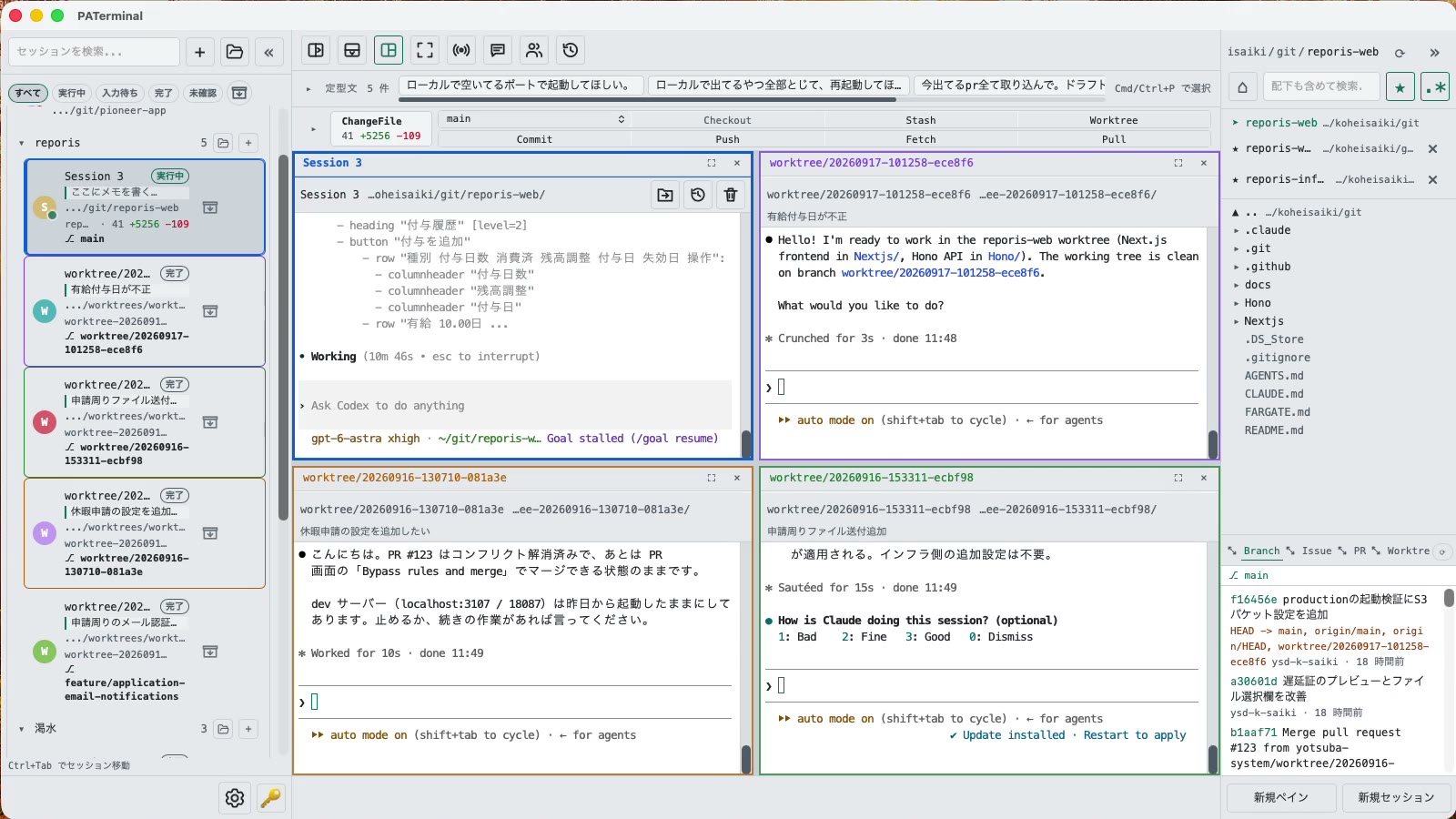
สำหรับคนที่รันเอเจนต์มากกว่าหนึ่งตัว
ทุกสิ่งที่จำเป็นสำหรับติดตามเอเจนต์ CLI หลายตัวพร้อมกันโดยไม่พลาดตัวใดเลย
เซสชันแบบขนาน
Each session gets its own independent pane tree. Group, pin, color-code, and annotate sessions with one-line notes. Restart the app and everything comes back — scrollback included.
บทสนทนาดำเนินต่อหลังรีสตาร์ต
PATerminal detects claude and codex and reopens them with --resume, so the conversation continues right where it left off. You can also hand off any past conversation to a fresh session from the history list.
โหมดจับคู่
Four modes: implement × review, cross-review, brainstorm, and co-implementation. Two agents pass prompts to each other automatically — you just watch the work happen.
มี Git ในตัว
Your changes are always visible in a strip above the terminal. Commit, push, pull, branch, and stash without leaving the app — plus PRs, issues, worktrees, and a built-in diff viewer.
ดูว่าแต่ละเอเจนต์กำลังทำอะไร
Each session shows whether it's running, waiting for input, or done. Sessions you're not looking at send a desktop notification when they finish or need approval.
กระจายอินพุตและวลี
Type once, send to every session at the same time. Keep your go-to prompts in the snippet bar and fire them with one click.
ตัวสำรวจไฟล์ในตัว
A file tree with recursive search, quick edits, trash-safe delete, and drag-and-drop moves — right next to your terminals.
17 ภาษา 5 ธีม ไม่มีเทเลเมทรี
No analytics, no tracking. License validation sends nothing beyond your key and a device name.
ดาวน์โหลด
ทดลองใช้ฟรี 30 วันเริ่มเมื่อเปิดใช้ครั้งแรก ไม่ต้องมีบัญชี
Windows SmartScreen may show “Windows protected your PC” because the app is new. Click “More info”, then “Run anyway”. If you want to be sure, compare the SHA-256 below before opening the file.
Windows installation guide: verify your downloadOn first launch, macOS may ask you to confirm opening an app downloaded from the internet. Choose Open.
System requirements: macOS 11+ / Windows 10+
ซอร์สโค้ดทั้งหมดของ PATerminal เปิดเผยต่อสาธารณะบน GitHub อ่านได้ว่าแอปทำอะไรบ้าง บิลด์เองได้ และยืนยันได้ว่าไม่มีการส่งเทเลเมทรี ดูซอร์สโค้ดบน GitHub
Review the End User License Agreement (EULA) before downloading and using PATerminal.
PATerminal เทียบกับเทอร์มินัลอื่น
เปรียบเทียบอย่างตรงไปตรงมาทีละหัวข้อกับเทอร์มินัลที่ถูกถามถึงบ่อยที่สุด พร้อมวันที่ตรวจสอบล่าสุดของแต่ละคอลัมน์
PATerminal vs Windows Terminal
Windows Terminal เป็นเทอร์มินัลฟรีที่ยอดเยี่ยม PATerminal เพิ่มสิ่งที่คุณต้องใช้ในการรัน Claude Code หรือ Codex หลายเซสชันพร้อมกัน: สถานะเอเจนต์ การกลับมาต่อบทสนทนา โน้ต แผง git และโหมดคู่ รองรับ Windows 10 ขึ้นไปและ macOS
PATerminal vs Warp
Warp มาพร้อมเอเจนต์ AI และเครดิตของตัวเอง PATerminal รันเอเจนต์ CLI ที่คุณจ่ายเงินอยู่แล้ว (Claude Code, Codex และอื่น ๆ) แบบขนาน โดยไม่ต้องมีบัญชี ไม่มีเครดิต และไม่มีเทเลเมทรี รองรับ Windows 10 ขึ้นไปและ macOS
PATerminal vs Orca
Orca เป็นสภาพแวดล้อมพัฒนาเอเจนต์แบบฟรีและโอเพนซอร์ส สร้างขึ้นรอบแนวคิด git worktree หนึ่งตัวต่อเอเจนต์หนึ่งตัว PATerminal เป็นเทอร์มินัลที่เบากว่า มีการจัดระเบียบเซสชัน การกลับมาต่อบทสนทนา และโหมดคู่ แบบไหนเหมาะกับเวิร์กโฟลว์ของคุณบน Windows หรือ macOS?