KI-Agenten × Mehrfachausführung
Ein Terminal mit mehreren Sitzungen für Claude Code, Codex und jeden CLI-Agenten — mit Git, Sitzungsfortsetzung und Pair Programming.
Der vollständige Quellcode von PATerminal ist auf GitHub öffentlich. Lesen Sie genau nach, was die App tut, bauen Sie sie selbst und prüfen Sie, dass sie keine Telemetrie sendet. Quellcode auf GitHub ansehen
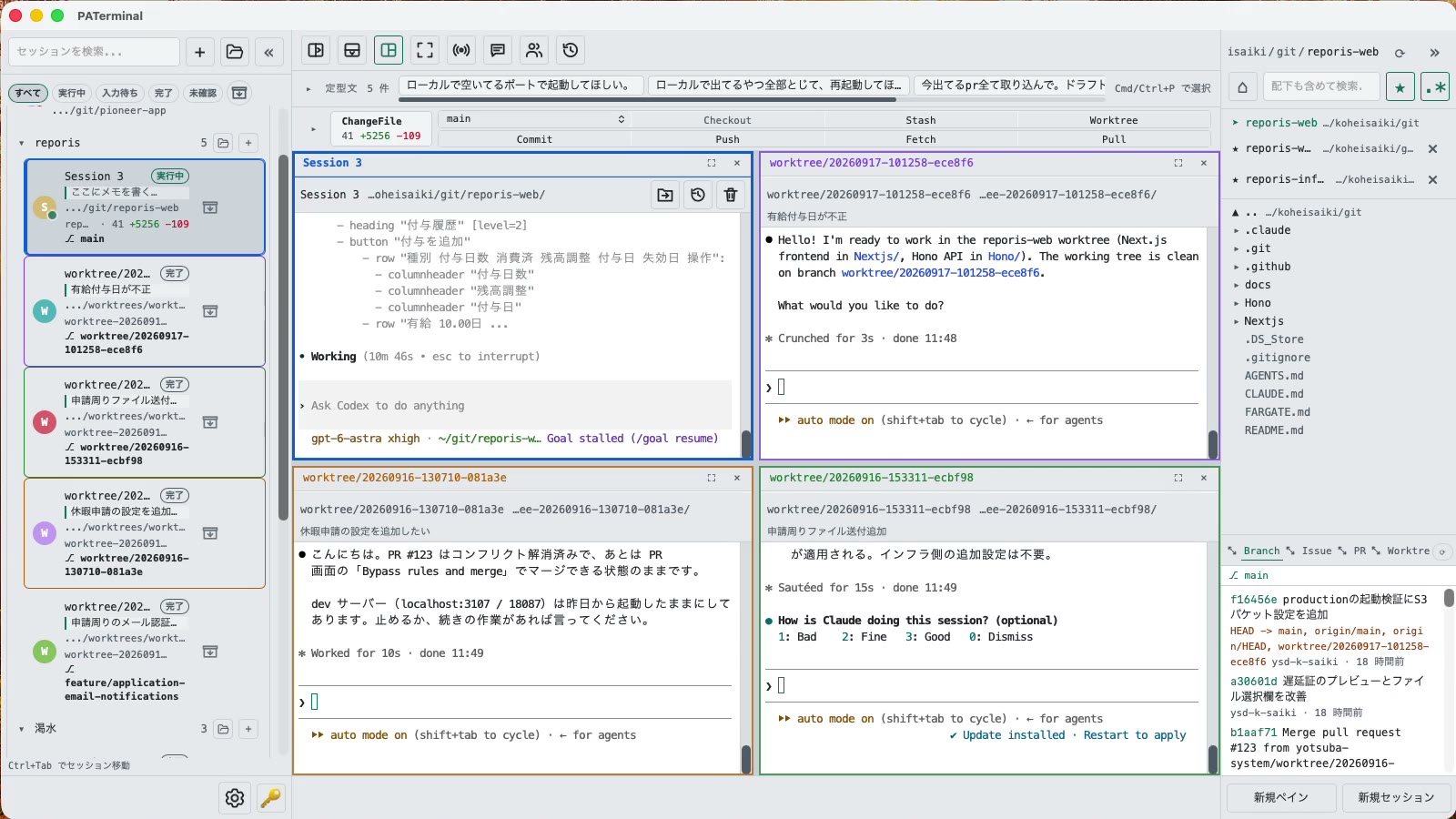
Für alle, die mehr als einen Agenten ausführen
Alles, was du brauchst, um mehrere CLI-Agenten gleichzeitig im Blick zu behalten.
Parallele Sitzungen
Each session gets its own independent pane tree. Group, pin, color-code, and annotate sessions with one-line notes. Restart the app and everything comes back — scrollback included.
Gespräche überleben Neustarts
PATerminal detects claude and codex and reopens them with --resume, so the conversation continues right where it left off. You can also hand off any past conversation to a fresh session from the history list.
Pair-Modus
Four modes: implement × review, cross-review, brainstorm, and co-implementation. Two agents pass prompts to each other automatically — you just watch the work happen.
Git integriert
Your changes are always visible in a strip above the terminal. Commit, push, pull, branch, and stash without leaving the app — plus PRs, issues, worktrees, and a built-in diff viewer.
Sieh, was jeder Agent tut
Each session shows whether it's running, waiting for input, or done. Sessions you're not looking at send a desktop notification when they finish or need approval.
Eingaben und Phrasen senden
Type once, send to every session at the same time. Keep your go-to prompts in the snippet bar and fire them with one click.
Integrierter Datei-Explorer
A file tree with recursive search, quick edits, trash-safe delete, and drag-and-drop moves — right next to your terminals.
17 Sprachen, 5 Themes, keine Telemetrie
No analytics, no tracking. License validation sends nothing beyond your key and a device name.
Download
Die kostenlose 30-Tage-Testversion beginnt beim ersten Start. Kein Konto erforderlich.
Windows SmartScreen may show “Windows protected your PC” because the app is new. Click “More info”, then “Run anyway”. If you want to be sure, compare the SHA-256 below before opening the file.
Windows installation guide: verify your downloadOn first launch, macOS may ask you to confirm opening an app downloaded from the internet. Choose Open.
System requirements: macOS 11+ / Windows 10+
Der vollständige Quellcode von PATerminal ist auf GitHub öffentlich. Lesen Sie genau nach, was die App tut, bauen Sie sie selbst und prüfen Sie, dass sie keine Telemetrie sendet. Quellcode auf GitHub ansehen
Review the End User License Agreement (EULA) before downloading and using PATerminal.
PATerminal im Vergleich
Ehrliche Gegenüberstellungen mit den Terminals, nach denen am häufigsten gefragt wird, jeweils mit dem Datum der letzten Prüfung.
PATerminal vs. Windows Terminal
Windows Terminal ist ein hervorragendes kostenloses Terminal. PATerminal ergänzt, was Sie brauchen, um mehrere Claude-Code- oder Codex-Sitzungen gleichzeitig zu betreiben: Agentenstatus, Fortsetzen von Gesprächen, Notizen, Git-Panel und Paarmodus. Windows 10+ und macOS.
PATerminal vs. Warp
Warp bringt einen eigenen KI-Agenten und Credits mit. PATerminal führt die CLI-Agenten, die Sie bereits bezahlen (Claude Code, Codex und mehr), parallel aus – ohne Konto, ohne Credits und ohne Telemetrie. Windows 10+ und macOS.
PATerminal vs. Orca
Orca ist eine kostenlose Open-Source-Entwicklungsumgebung für Agenten, aufgebaut um einen Git-Worktree pro Agent. PATerminal ist ein leichteres Terminal mit Sitzungsorganisation, Fortsetzen von Gesprächen und Paarmodus. Was passt zu Ihrem Workflow unter Windows oder macOS?