Agen AI × Eksekusi multi
Terminal multi-sesi untuk menjalankan Claude Code, Codex, dan setiap agen CLI bersama-sama, dengan Git, lanjutkan sesi, dan pair programming bawaan.
Seluruh kode sumber PATerminal terbuka untuk umum di GitHub. Baca persis apa yang dilakukan aplikasi, bangun sendiri, dan pastikan aplikasi tidak mengirim telemetri. Lihat kode sumber di GitHub
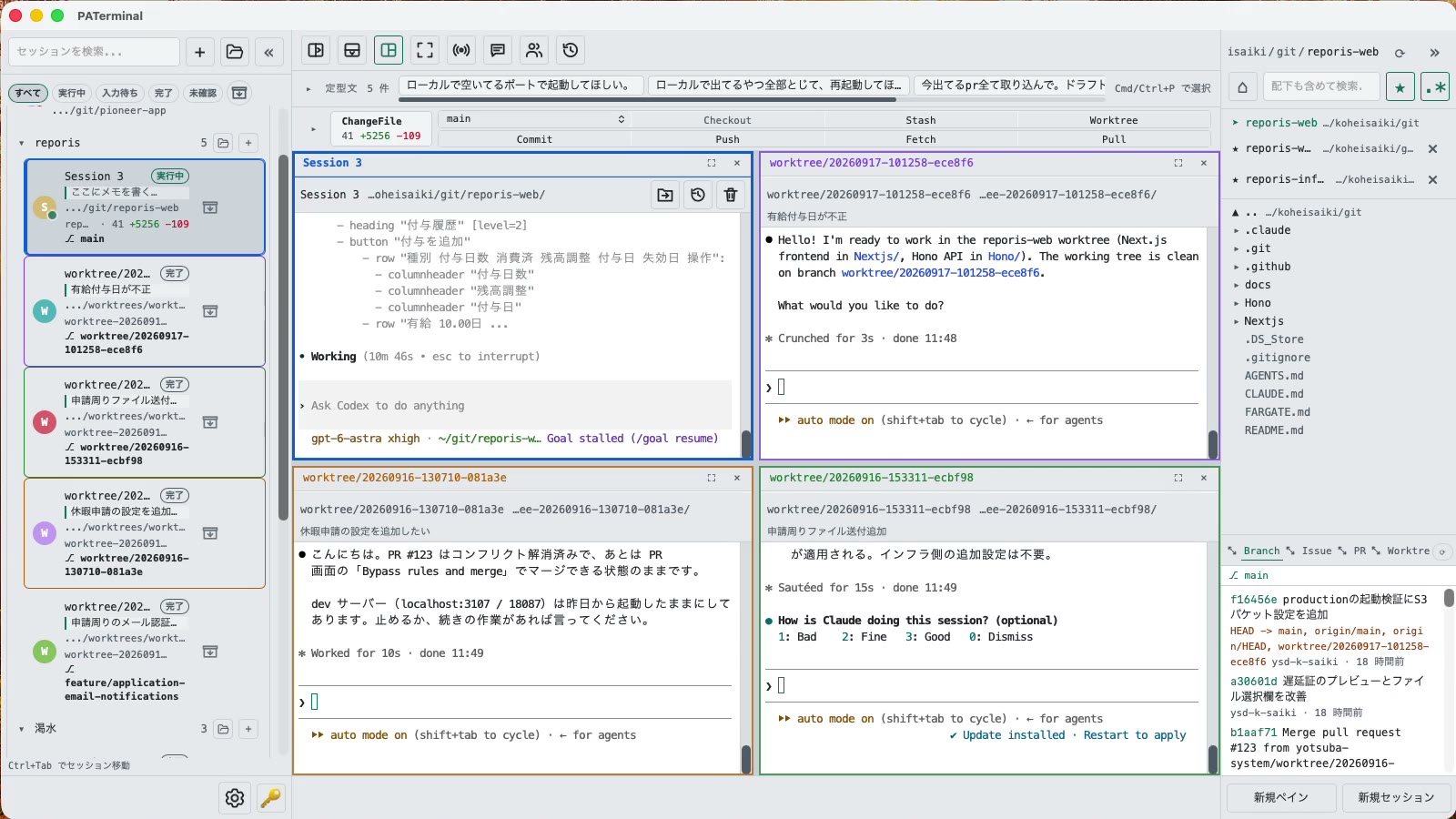
Untuk orang yang menjalankan lebih dari satu agen
Semua yang Anda perlukan untuk memantau beberapa agen CLI sekaligus tanpa kehilangan jejak.
Sesi paralel
Each session gets its own independent pane tree. Group, pin, color-code, and annotate sessions with one-line notes. Restart the app and everything comes back — scrollback included.
Percakapan bertahan setelah mulai ulang
PATerminal detects claude and codex and reopens them with --resume, so the conversation continues right where it left off. You can also hand off any past conversation to a fresh session from the history list.
Mode pasangan
Four modes: implement × review, cross-review, brainstorm, and co-implementation. Two agents pass prompts to each other automatically — you just watch the work happen.
Git bawaan
Your changes are always visible in a strip above the terminal. Commit, push, pull, branch, and stash without leaving the app — plus PRs, issues, worktrees, and a built-in diff viewer.
Lihat pekerjaan setiap agen
Each session shows whether it's running, waiting for input, or done. Sessions you're not looking at send a desktop notification when they finish or need approval.
Siarkan input dan frasa
Type once, send to every session at the same time. Keep your go-to prompts in the snippet bar and fire them with one click.
Penjelajah berkas bawaan
A file tree with recursive search, quick edits, trash-safe delete, and drag-and-drop moves — right next to your terminals.
17 bahasa, 5 tema, tanpa telemetri
No analytics, no tracking. License validation sends nothing beyond your key and a device name.
Unduh
Uji coba gratis 30 hari dimulai saat pertama kali dijalankan. Tidak perlu akun.
Windows SmartScreen may show “Windows protected your PC” because the app is new. Click “More info”, then “Run anyway”. If you want to be sure, compare the SHA-256 below before opening the file.
Windows installation guide: verify your downloadOn first launch, macOS may ask you to confirm opening an app downloaded from the internet. Choose Open.
System requirements: macOS 11+ / Windows 10+
Seluruh kode sumber PATerminal terbuka untuk umum di GitHub. Baca persis apa yang dilakukan aplikasi, bangun sendiri, dan pastikan aplikasi tidak mengirim telemetri. Lihat kode sumber di GitHub
Review the End User License Agreement (EULA) before downloading and using PATerminal.
PATerminal dibandingkan terminal lain
Perbandingan jujur, poin demi poin, dengan terminal yang paling sering ditanyakan, lengkap dengan tanggal pemeriksaan terakhir tiap kolom.
PATerminal vs Windows Terminal
Windows Terminal adalah terminal gratis yang hebat. PATerminal menambahkan yang Anda butuhkan untuk menjalankan beberapa sesi Claude Code atau Codex sekaligus: status agen, melanjutkan percakapan, catatan, panel git, dan mode berpasangan. Windows 10+ dan macOS.
PATerminal vs Warp
Warp menyertakan agen AI dan kredit miliknya sendiri. PATerminal menjalankan agen CLI yang sudah Anda bayar (Claude Code, Codex, dan lainnya) secara paralel, tanpa akun, tanpa kredit, dan tanpa telemetri. Windows 10+ dan macOS.
PATerminal vs Orca
Orca adalah lingkungan pengembangan agen gratis dan sumber terbuka yang dibangun di sekitar satu git worktree per agen. PATerminal adalah terminal yang lebih ringan dengan pengaturan sesi, melanjutkan percakapan, dan mode berpasangan. Mana yang cocok dengan alur kerja Anda di Windows atau macOS?