Agentes de IA × Execução múltipla
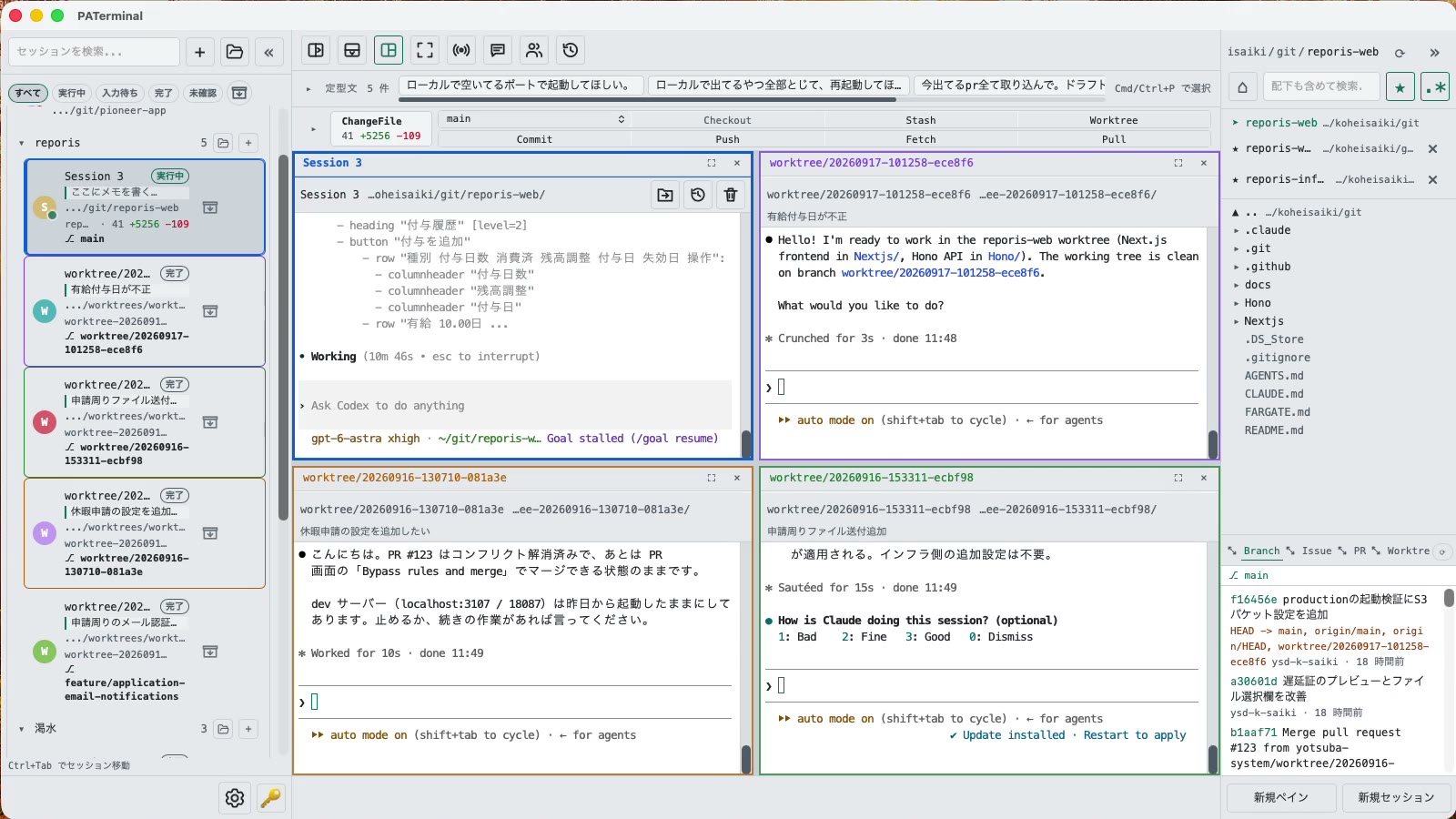
Um terminal com múltiplas sessões para executar Claude Code, Codex e outros agentes de CLI ao mesmo tempo, com Git, retomada de sessões e programação em par integrados.
O código-fonte completo do PATerminal é público no GitHub. Leia exatamente o que o app faz, compile você mesmo e confirme que ele não envia telemetria. Ver o código no GitHub
Para quem executa mais de um agente
Tudo que você precisa para acompanhar vários agentes de CLI trabalhando ao mesmo tempo.
Sessões paralelas
Each session gets its own independent pane tree. Group, pin, color-code, and annotate sessions with one-line notes. Restart the app and everything comes back — scrollback included.
Conversas sobrevivem a reinicializações
PATerminal detects claude and codex and reopens them with --resume, so the conversation continues right where it left off. You can also hand off any past conversation to a fresh session from the history list.
Modo de pareamento
Four modes: implement × review, cross-review, brainstorm, and co-implementation. Two agents pass prompts to each other automatically — you just watch the work happen.
Git integrado
Your changes are always visible in a strip above the terminal. Commit, push, pull, branch, and stash without leaving the app — plus PRs, issues, worktrees, and a built-in diff viewer.
Veja o que cada agente faz
Each session shows whether it's running, waiting for input, or done. Sessions you're not looking at send a desktop notification when they finish or need approval.
Transmitir entradas e frases
Type once, send to every session at the same time. Keep your go-to prompts in the snippet bar and fire them with one click.
Explorador de arquivos integrado
A file tree with recursive search, quick edits, trash-safe delete, and drag-and-drop moves — right next to your terminals.
17 idiomas, 5 temas, zero telemetria
No analytics, no tracking. License validation sends nothing beyond your key and a device name.
Baixar
O teste grátis de 30 dias começa no primeiro início. Não precisa de conta.
Windows SmartScreen may show “Windows protected your PC” because the app is new. Click “More info”, then “Run anyway”. If you want to be sure, compare the SHA-256 below before opening the file.
Windows installation guide: verify your downloadOn first launch, macOS may ask you to confirm opening an app downloaded from the internet. Choose Open.
System requirements: macOS 11+ / Windows 10+
O código-fonte completo do PATerminal é público no GitHub. Leia exatamente o que o app faz, compile você mesmo e confirme que ele não envia telemetria. Ver o código no GitHub
Review the End User License Agreement (EULA) before downloading and using PATerminal.
PATerminal em comparação com outros terminais
Comparações honestas, ponto a ponto, com os terminais sobre os quais mais perguntam, com a data em que cada coluna foi verificada.
PATerminal vs Windows Terminal
O Windows Terminal é um ótimo terminal gratuito. O PATerminal acrescenta o que você precisa para rodar várias sessões do Claude Code ou Codex ao mesmo tempo: status dos agentes, retomada de conversas, notas, painel de git e modo par. Windows 10+ e macOS.
PATerminal vs Warp
O Warp traz seu próprio agente de IA e créditos. O PATerminal executa em paralelo os agentes de CLI pelos quais você já paga (Claude Code, Codex e outros), sem conta, sem créditos e sem telemetria. Windows 10+ e macOS.
PATerminal vs Orca
O Orca é um ambiente de desenvolvimento de agentes gratuito e de código aberto construído em torno de um worktree do git por agente. O PATerminal é um terminal mais leve com organização de sessões, retomada de conversas e modo par. Qual se encaixa no seu fluxo de trabalho no Windows ou macOS?