Yapay zekâ ajanları × Çoklu çalıştırma
Claude Code, Codex ve her CLI ajanını aynı anda çalıştırmak için çok oturumlu terminal; Git, oturum sürdürme ve eşli programlama dahildir.
PATerminal'in tüm kaynak kodu GitHub'da herkese açıktır. Uygulamanın tam olarak ne yaptığını okuyun, kendiniz derleyin ve telemetri göndermediğini doğrulayın. Kaynak kodu GitHub'da görüntüle
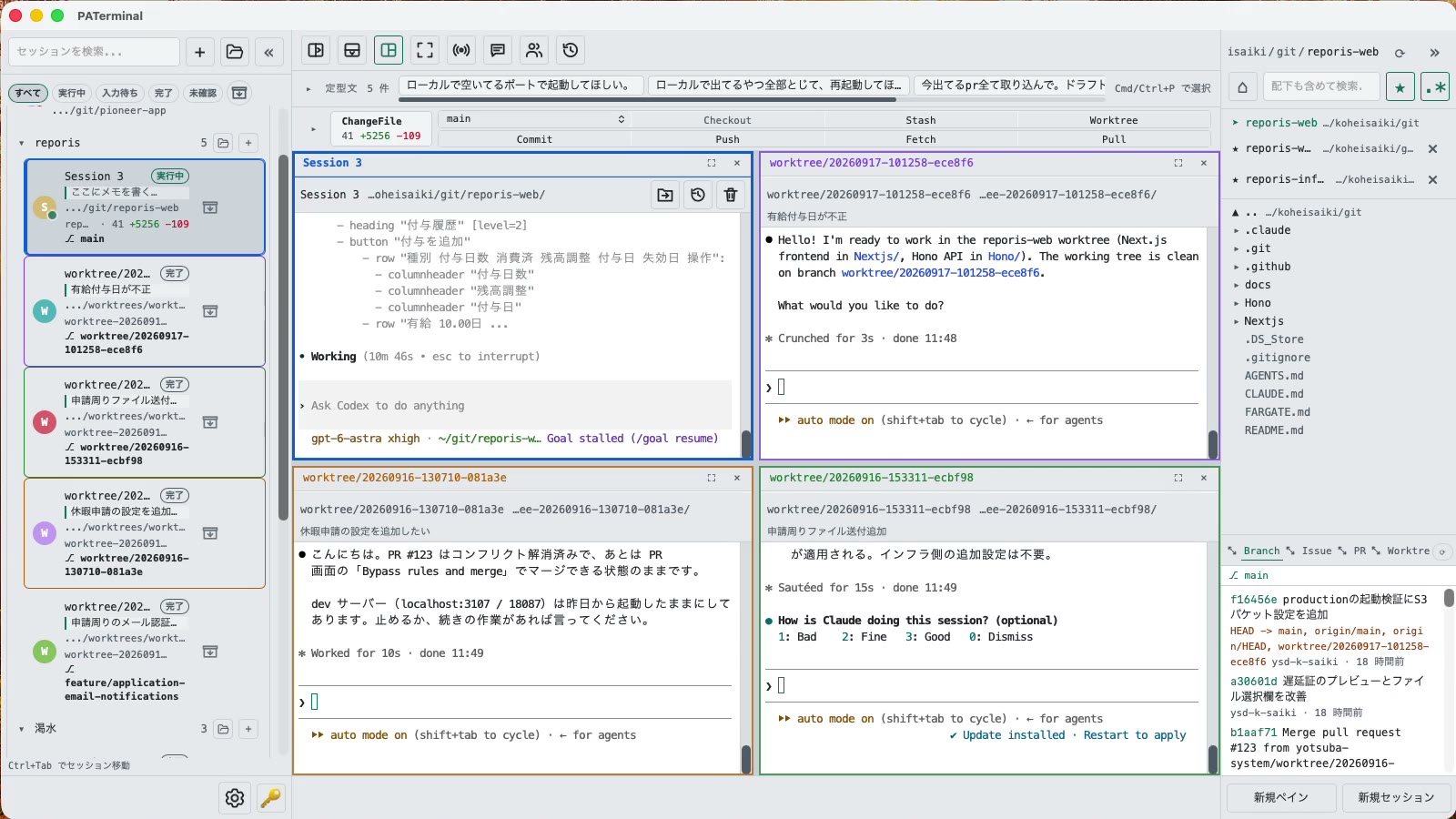
Birden fazla ajan çalıştıranlar için
Birden çok CLI ajanını aynı anda hiçbirini gözden kaçırmadan yönetmeniz için gereken her şey.
Paralel oturumlar
Each session gets its own independent pane tree. Group, pin, color-code, and annotate sessions with one-line notes. Restart the app and everything comes back — scrollback included.
Sohbetler yeniden başlatmadan sonra sürer
PATerminal detects claude and codex and reopens them with --resume, so the conversation continues right where it left off. You can also hand off any past conversation to a fresh session from the history list.
Eşli mod
Four modes: implement × review, cross-review, brainstorm, and co-implementation. Two agents pass prompts to each other automatically — you just watch the work happen.
Git yerleşik
Your changes are always visible in a strip above the terminal. Commit, push, pull, branch, and stash without leaving the app — plus PRs, issues, worktrees, and a built-in diff viewer.
Her ajanın ne yaptığını görün
Each session shows whether it's running, waiting for input, or done. Sessions you're not looking at send a desktop notification when they finish or need approval.
Girdi ve ifadeleri yayınlayın
Type once, send to every session at the same time. Keep your go-to prompts in the snippet bar and fire them with one click.
Yerleşik dosya gezgini
A file tree with recursive search, quick edits, trash-safe delete, and drag-and-drop moves — right next to your terminals.
17 dil, 5 tema, sıfır telemetri
No analytics, no tracking. License validation sends nothing beyond your key and a device name.
İndir
30 günlük ücretsiz deneme ilk açılışta başlar. Hesap gerekmez.
Windows SmartScreen may show “Windows protected your PC” because the app is new. Click “More info”, then “Run anyway”. If you want to be sure, compare the SHA-256 below before opening the file.
Windows installation guide: verify your downloadOn first launch, macOS may ask you to confirm opening an app downloaded from the internet. Choose Open.
System requirements: macOS 11+ / Windows 10+
PATerminal'in tüm kaynak kodu GitHub'da herkese açıktır. Uygulamanın tam olarak ne yaptığını okuyun, kendiniz derleyin ve telemetri göndermediğini doğrulayın. Kaynak kodu GitHub'da görüntüle
Review the End User License Agreement (EULA) before downloading and using PATerminal.
PATerminal diğer terminallere karşı
En çok sorulan terminallerle madde madde dürüst karşılaştırmalar; her sütunun son kontrol tarihiyle birlikte.
PATerminal ve Windows Terminal
Windows Terminal harika bir ücretsiz terminaldir. PATerminal, aynı anda birden çok Claude Code veya Codex oturumu çalıştırmak için gerekenleri ekler: ajan durumu, sohbete kaldığı yerden devam, notlar, git paneli ve eş modu. Windows 10+ ve macOS.
PATerminal ve Warp
Warp kendi yapay zekâ ajanını ve kredilerini birlikte getirir. PATerminal, zaten ödediğiniz CLI ajanlarını (Claude Code, Codex ve diğerleri) hesap, kredi ve telemetri olmadan paralel çalıştırır. Windows 10+ ve macOS.
PATerminal ve Orca
Orca, ajan başına bir git worktree etrafında kurulmuş ücretsiz ve açık kaynaklı bir ajan geliştirme ortamıdır. PATerminal ise oturum düzenleme, sohbete devam ve eş modu sunan daha hafif bir terminaldir. Windows veya macOS'ta hangisi iş akışınıza uyar?