AI 代理 × 多工執行
專為同時執行 Claude Code、Codex 與其他 CLI 代理打造的多工作階段終端機,內建 Git、對話復原與結對程式設計。
PATerminal 的完整原始碼公開於 GitHub。你可以逐行檢視應用程式做了什麼、自行建置,並確認它不會傳送遙測資料。 在 GitHub 上查看原始碼
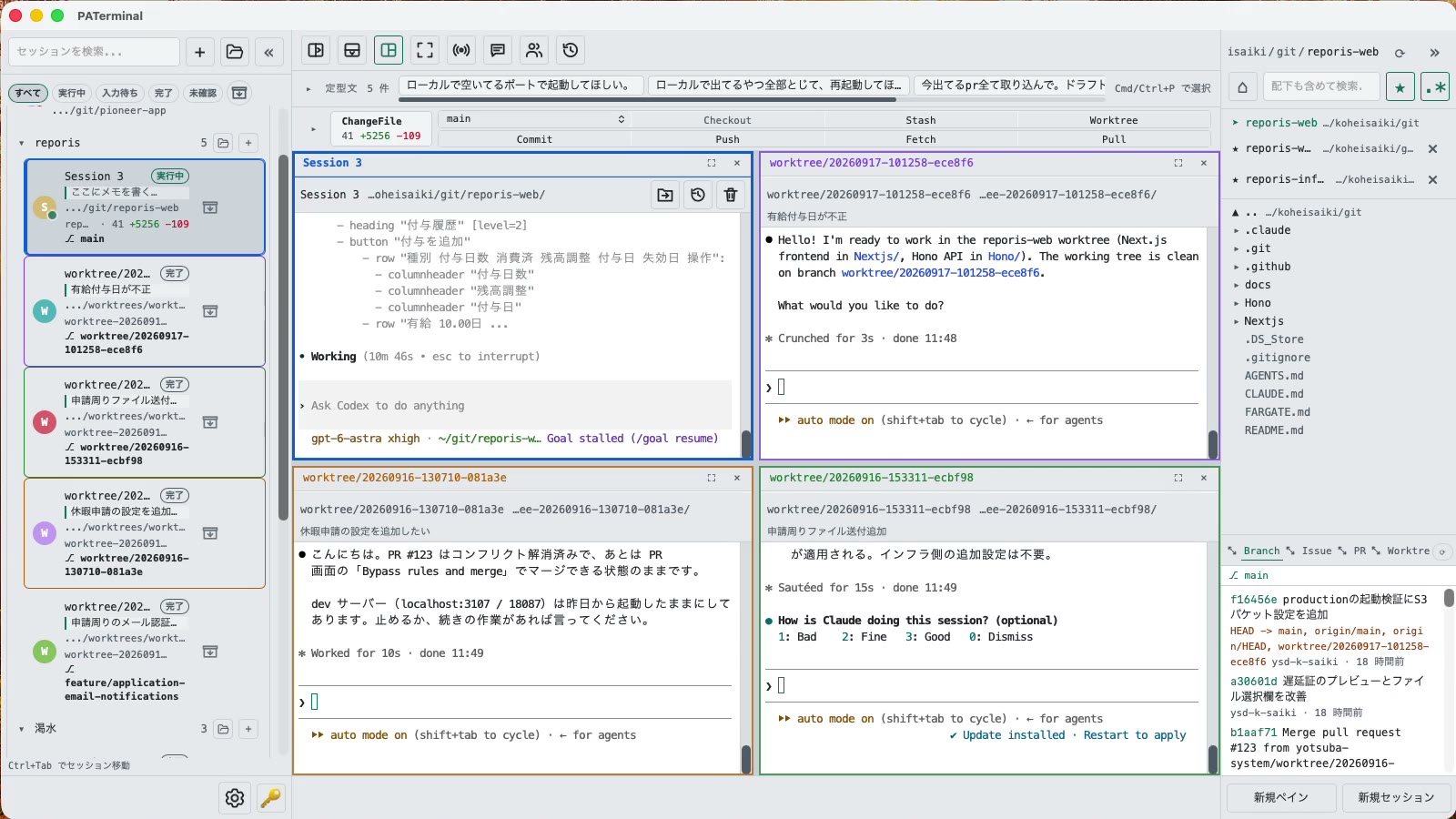
為同時執行多個代理的人打造
管理多個 CLI 代理所需的一切功能,始終掌握每個代理的狀態。
平行工作階段
Each session gets its own independent pane tree. Group, pin, color-code, and annotate sessions with one-line notes. Restart the app and everything comes back — scrollback included.
重新啟動後延續對話
PATerminal detects claude and codex and reopens them with --resume, so the conversation continues right where it left off. You can also hand off any past conversation to a fresh session from the history list.
結對模式
Four modes: implement × review, cross-review, brainstorm, and co-implementation. Two agents pass prompts to each other automatically — you just watch the work happen.
內建 Git
Your changes are always visible in a strip above the terminal. Commit, push, pull, branch, and stash without leaving the app — plus PRs, issues, worktrees, and a built-in diff viewer.
查看每個代理的狀態
Each session shows whether it's running, waiting for input, or done. Sessions you're not looking at send a desktop notification when they finish or need approval.
廣播輸入與片語
Type once, send to every session at the same time. Keep your go-to prompts in the snippet bar and fire them with one click.
內建檔案總管
A file tree with recursive search, quick edits, trash-safe delete, and drag-and-drop moves — right next to your terminals.
17 種語言、5 個主題、零遙測
No analytics, no tracking. License validation sends nothing beyond your key and a device name.
下載
首次啟動即開始 30 天免費試用,無需帳戶。
Windows SmartScreen may show “Windows protected your PC” because the app is new. Click “More info”, then “Run anyway”. If you want to be sure, compare the SHA-256 below before opening the file.
Windows installation guide: verify your downloadOn first launch, macOS may ask you to confirm opening an app downloaded from the internet. Choose Open.
System requirements: macOS 11+ / Windows 10+
PATerminal 的完整原始碼公開於 GitHub。你可以逐行檢視應用程式做了什麼、自行建置,並確認它不會傳送遙測資料。 在 GitHub 上查看原始碼
Review the End User License Agreement (EULA) before downloading and using PATerminal.
PATerminal 與其他終端機的比較
與大家最常詢問的終端機逐項比較,並標註每一欄的最後查核日期。
PATerminal vs Windows Terminal
Windows Terminal 是一款出色的免費終端機。PATerminal 在此之上補足了同時執行多個 Claude Code 或 Codex 工作階段所需的一切:代理狀態、對話復原、備註、Git 面板與結對模式。支援 Windows 10 以上與 macOS。
PATerminal vs Warp
Warp 內建自家的 AI 代理並以點數計費。PATerminal 平行執行你已經付費的 CLI 代理(Claude Code、Codex 等),不需帳號、沒有點數、沒有遙測。支援 Windows 10 以上與 macOS。
PATerminal vs Orca
Orca 是一款免費開源的代理開發環境,以「每個代理一個 git worktree」為核心。PATerminal 是一款較輕量的終端機,提供工作階段整理、對話復原與結對模式。在 Windows 或 macOS 上,哪一款更適合你的工作流程?